![pd-logo-color-1.png]](https://support.powerdetails.com/hs-fs/hubfs/pd-logo-color-1.png?width=200&height=40&name=pd-logo-color-1.png)
Administrators can access this by hovering over Advanced on the top menu bar and clicking Event Log.
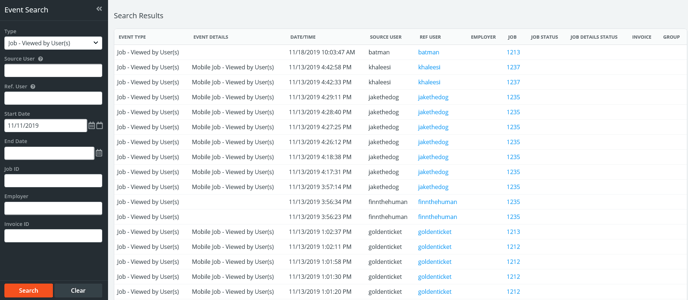
Events are listed to the right of the filter panel with the most recent activities appearing at the top of the page. To search for a specific event, enter your criteria in the filters press Search. The table below explains the search filters on this page.
| Field | Description |
| Type | Filters based on the type of event. |
| Source User | User ID of the person who performed an action. |
| Ref. User | User ID of the person affected by an action. |
| Start/End Date | Date range in which to search. |
| Job ID | Specific job ID involved in the event. |
| Employer | If applicable, name of the employer involved in the event. |
| Invoice ID | If applicable, invoice ID involved in the event. |
Some common examples of how the Event Log might be used include:
- Finding the history of a job and who created it - Insert the Job ID in question and change the start date back as far as needed.
- Viewing a certain user's activity - Enter a person's user ID in the Source User field along with a date range to view all user activity for that period
- Monitor if rules, job sets, or groups have been modified - Use the Type field to select something like "Job Set - Modified" along with a date range.
If you need any assistance or more detailed information regarding activity in your site, please reach out to us at support@powerdetails.com.